If you work long enough at a big enough organization you will come across formal “project management”. Perhaps the place you work will be large enough that there are people whose entire job is ‘project manager’ or (after a while) ‘program manager’.
At first this can feel confusing or even intimidating, especially if you haven’t studied project management. How will you know if changing the successors on your predecessor task is going to affect someone else’s timeline and what the impact is to the gannt chart?
That’s solved that today! Basic project management is much easier than it looks and by the end of this article you’ll be a full fledged Amateur!
Why Do We Need Project Management At All?
You get your work done. You do it on time and you do it the way it was asked. So is there really a need for a project manager (abbreviated to ‘PMs’ most of the time) to be asking if you’re on track?
Let’s step away from data science where most work is 1) non-tangible and easy to change and 2) can often be split into parts that can be worked on simultaneously. Much of the world doesn’t work that way. Let’s talk about bridges.
Bridges – Nothing Like Data Science!
Bridges are real physical objects in the world; your analyses/predictive models/PowerPoint presentations are not. Bridges have to be done in prescribed order of steps; in data science we can start building a model while a co-worker prepares a data feed and we can both collaborate on the presentation, all in the same day. No bridge builder starts the roadway while the pillars are halfway erected.
This is where the project managers come in. The project manager keeps track of the work that’s happening, that work that will happen and makes sure all the pieces fit together on time. The pylons have to be built before the road so the PMs will make sure the plyon experts are on site before the roadway team! But the cement needs to be ordered to build the pylons? The PM will make sure the order is placed, the invoice is paid and the cement arrives on time before the pylon experts arrive. There are structural tests that have to happen once the pylons are done, but can the roadway start before those tests are finished? The PM will make sure the inspector knows when to arrive for the test and that the road crew knows just how much they can build before the tests are done.
A lot of a PM’s job is managing these moving pieces while also keeping an eye on risk. What happens to the schedule if the inspector doesn’t pass the test? Or if the cement isn’t on time? Any number of things can go wrong and it’s the PMs job to be ready for them.
In these settings having a good PM can smooth the surprises that inevitably happen any time a group of people try to accomplish something big. And historically government projects were one of the largest drivers of growth in the project management field because so many government projects are big.
Tools of the Trade
Project managers will track all of this in a project plan. And that plan is often visualized as a Gannt Chart. These are two simple but powerful tools that any Amateur can understand.
The Project Plan
A fundamental part of project planning is breaking the total project into smaller parts. These parts can then be coordinated and moved as needed to get the work done. Let’s go back to our bridge example and imagine there are 6 steps (and how long they take) that need to happen:
- Pour cement pylons (4 weeks)
- Place steel beams across pylons (4 weeks)
- Build and pave roadway on top of steel beams (2 weeks)
- Pass government safety inspections (1 week)
- Connect bridge to existing roads on both sides (2 weeks)
- Paint road stripes on the completed bridge (1 week)
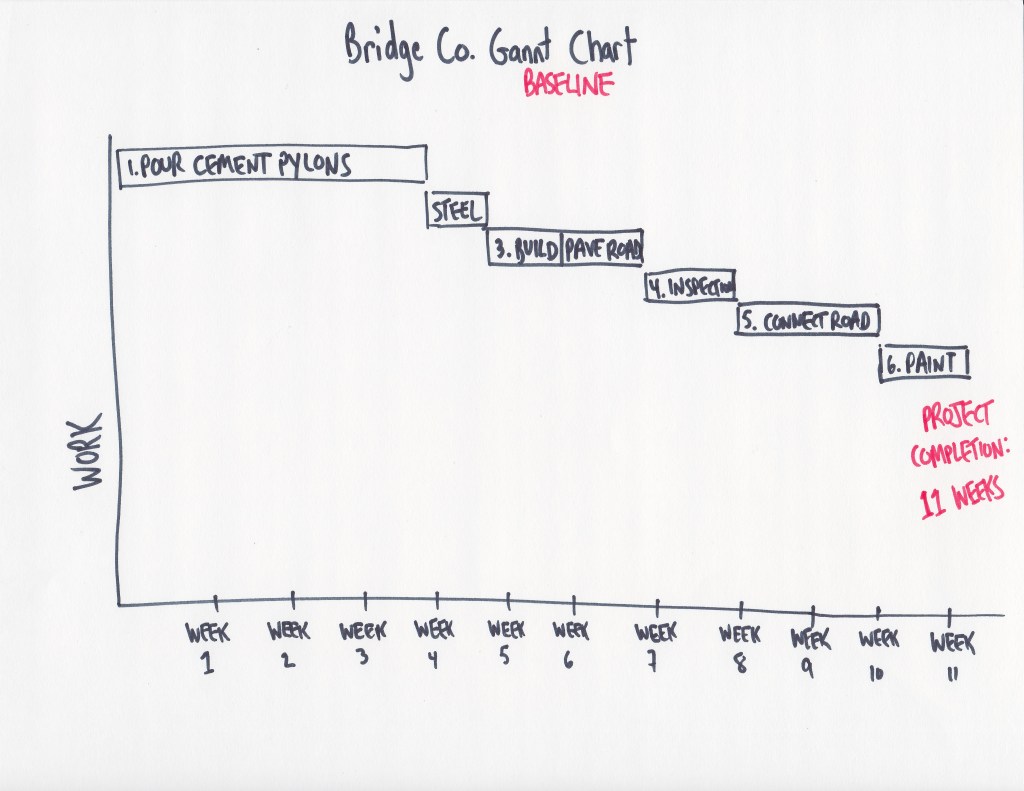
Pretty straightforward and one version of a Project Plan is to do these tasks in order, one after the other and this bridge can be built in 11 weeks. Done! Right?
The Gannt Chart
Before we look at how we can refine that plan let’s talk about Gannt Charts while we have a simple example. A Gannt Chart is a way to visual how tasks relate to each other and when they can be accomplished. For our example plan above, here’s what the Gannt chart looks like. Since we’ve decided to just do the tasks in order, the chart reflects that.
Refining the Plan
We have a plan and we know the general order that work has to happen (after all we can’t ‘Place steel beams across pylons’ if we didn’t ‘Pour cement pylons’ yet). This is a great start! Now a PM will start to ask where we can condense this work. For example:
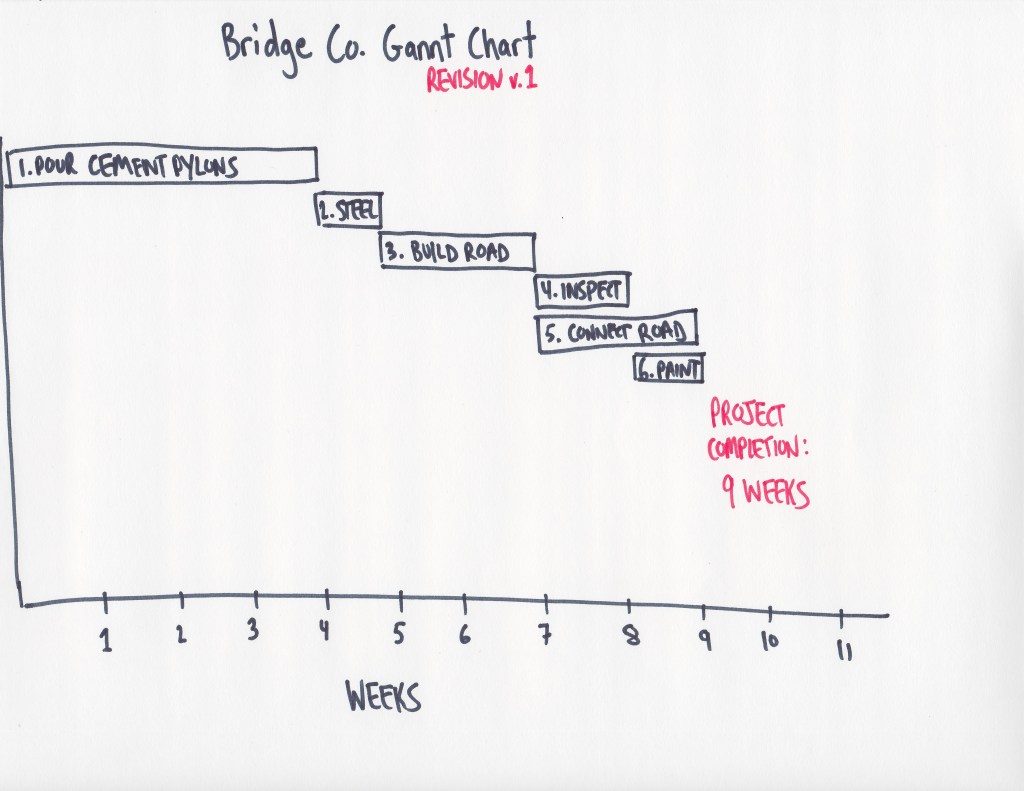
- We can overlap Step4 and Step5. The inspection of the bridge is unrelated connecting the bridge to our side streets.
- Step6 can be done as soon as Step4 is completed. Once the safety inspection is done there will be no more changes to the bridge so the road lines can be painted.
This ability to overlap tasks means that we can save two weeks in our total plan. Now, we can complete this bridge in 9 weeks instead of 11 weeks. And here’s our Gannt chart with these updates, notice how some tasks overlap.
As your project goes on and deadlines are met early (or missed), you can imagine how these pieces of the Gannt chart will shift forward and backward in the schedule.
Predecessors and Dependencies
We’ve just refined our plan manually which we can do when there are only six steps. It’s not realistic to do this when there are hundreds or thousands of tasks that have mulitple relationships with each other.
So rather than try to line up all the tasks, a PM will assign what are called “predecessors” and “dependencies”. A predecessor is a task that has to happen before another task. Likewise a successor, has to happen after a task. In our example Step2 to a successor to Step1. Or, said in reverse, Step1 is a predecessor to Step2. And strictly speaking Step3-6 are all dependencies on Step2 since none of them can happen without Step2 being done.
Once these relationship are all built, project management software can immediately created your plan, its timeline and your Gannt charts. More importantly, when something changes having these predecessor and successor relationships will let you reset your plan quickly.
Waterfalls and Agile
Everything described above is what’s called “waterfall” and if you look at the Gannt Chart you can imagine it looking like a profile view of a waterfall. You’ll also come across the “agile” methodology. This is more suited to iteration and fast changes. Both methods have a place in the right setting. In a future article I’ll break down agile methods as well.
 Amateur Data Science