
What are we doing here?
The United States has one of the largest national park systems in the world with hundreds of sites. While the sixty-three parks themselves are what people first think of there are also national monuments, historical sites and more that fall under the NPS.
The NPS sells a passport-like booklet that can be stamped at each site as you visit. Both of my kids have one and we’ve enjoyed collecting the stamps when we travel. That led me to wonder if I could plot an online map of every NPS site and code it for whether I’ve visited or not.
To make this map we’re going to walk through several steps. This project will show what a data project is like in the real world where data may not be available. And like many real world projects it became lengthier than originally expected so I’m breaking this Take My Code tutorial into several sections:
- Scraping the needed data from the NPS.gov website with Python
- Passing this data through the Google API to get each park’s latitude and longitude with Python
- Plot all these locations on an interactive map in Tableau. When we’re done, we’ll have made this dashboard.
It Always Starts with Data
Getting this data turned out to be a larger effort than the dashboard and mapping work. If NPS.gov had a downloadable spreadsheet this would be a short article. But I couldn’t readily find one so we have to figure out how to get this data. I can see that all the data I need is listed on the NPS website, organized by state and listing all the sites in each state. You can see an example of New York here. It’s also worth noting that in addition to the 50 states, the NPS has pages for other, non-state, areas such as Washington DC and Virgin Islands.
In Part 1 of this tutorial we’re going to do three things:
- Check the nps.gov site and create a loop to access each state’s page
- Open each of these pages and access the html code underneath it using a headless web browser via the selenium package
- Organize this data with the BeautifulSoup package and extract the elements we want
Site Structure
Before we code anything take a look at nps.gov/findapark. Initially I hoped I’d find a “Download Here” button that listed every site in the NPS system. No such luck (here or elsewhere). Instead the the site is organized by state/territory and on each area page there is a description of all the sites in that state. So we need a process that can access all 54 state/territory pages to find the data we care about and save it.
The good news is that the website has a structure. If you click a state you can see a consistent url is created. “https://www.nps.gov/state/oh/index.htm” is the Ohio link and clicking other states shows that the link is always in the format of: nps.gov/<area_abbreviation>/index.htm
Our first step is to write a loop to generate the url for each of these pages
##First let's create a list of states and a FOR loop that can iterate across that list to create each url needed for each of 50 states listed.

states = ['AL','AK','AZ','AR','CA','CO','CT','DE','FL','GA','HI','ID','IL','IN','IA','KS','KY','LA','ME','MD','MA','MI','MN','MS','MO','MT','NE','NV','NH','NJ','NM','NY','NC','ND','OH','OK','OR','PA','RI','SC','SD','TN','TX','UT','VT','VA','WA','WV','WI','WY','AS','DC','GU','PR','VI','MP' ]

for entry in states:
    url = 'https://www.nps.gov/state/'+entry+'/index.htm'
    print (url)
The above code will just generated 56 unique urls, one for each page the NPS hosts. These urls will become an input into our next step.
Access All 56 webpages and save their source code
Great! We’ve now got 56 unique URLs, one for each state/territory in the NPS system. Eventually our code will loop over each of those URLs but let’s not get ahead of ourselves. Before we tackle all of them, let’s start with one.
The code below will open a url (currently hard-coded as Ohio) and it will save the page source data to your local machine where we can look at it. It’s the same thing you can do manually by opening the page in your browser and clicking Save As. In fact, you can comment out the line ‘opts.set_headless’ and your machine will open a browser window when you run. Try it out!
url = 'https://www.nps.gov/state/oh/index.htm'

import time
import datetime
from selenium.webdriver import Firefox
from selenium.webdriver.firefox.options import Options
opts = Options()
opts.headless = True

browser = Firefox(options=opts)
browser.get(url)
html_save = browser.page_source
browser.quit()

import os
try:
    os.remove("HTMLOut.txt")
except OSError:
    pass
f=open("HTMLOut.txt", 'a')
f.write(html_save)
f.close()
There’s now a file in your working directory called HTMLOut.txt which is the source code of the website. Let’s open that in a notepad editor and see what we’re working with.
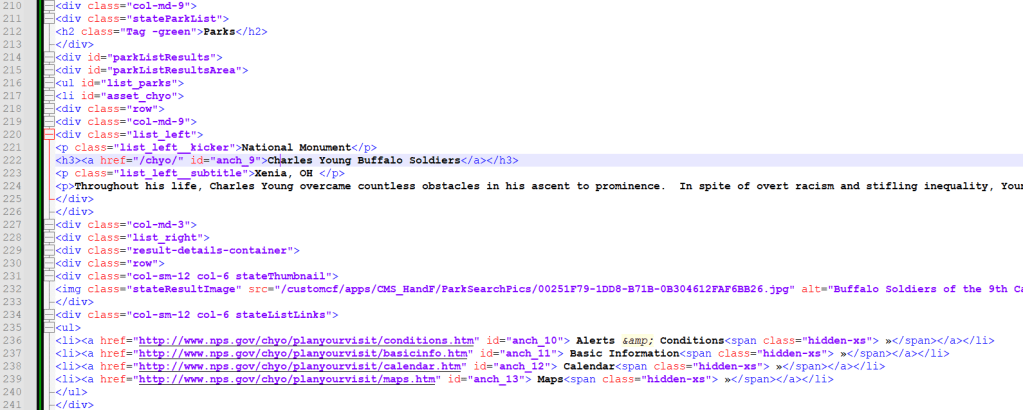
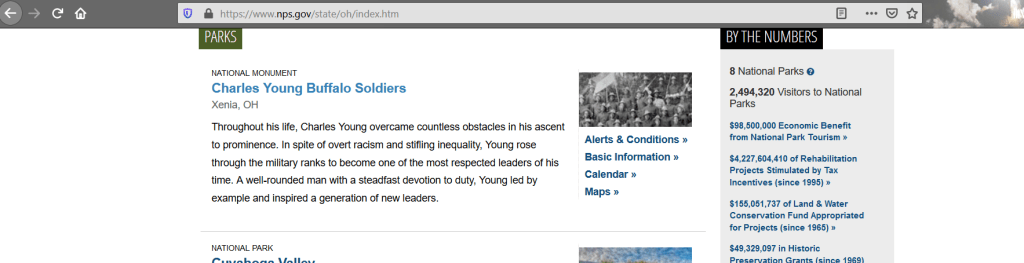
If you don’t know HTML most of this file will be indecipherable but it’s not as bad as it looks. Start by scrolling down and try to find the sections that list the National Park sites, an example is below. If you open the url from your code in your browser you can see how the source code matches the website itself. (Hint, you can match the black font from the code, to the text in the webpage itself.)
Parsing the Source Code File
So, we’ve got code that downloads an HTML file and we can visually see that this file has the data we want. But our data is not yet in a format we can work with. To get there we’re going to use Python’s BeautifulSoup package to parse this code and extract only the park information. It may not seem like it but HTML code is divided into sections, with subsections in those and sub-subsections in those. BeautifulSoup lets us move up and down those subsections to get to the data we need.
In my example, after some looking around the code and the webpage itself, I realized that there’s a section titled <div id =”parkListResultsArea”>. It’s line 215 in my example image, see if you can find it in your HTMLOut file.
Got it? Look at the rows underneath while you look at the live webpage. Do you see the connections? There’s a class called ‘list_left_kicker’ which tells you the type of park. Then, there’s a tag called <h3> that has the name of the park in it. Keep scrolling and you’ll see that for each park, there’s a repeating block of code. So first, let’s isolate just the part of the code that has the id of “parkListResultsArea”
from bs4 import BeautifulSoup
import urllib
parkpage = r"HTMLOut.txt"
page = open(parkpage)
soup = BeautifulSoup(page.read(),'html.parser')
parkList = soup.find(id="parkListResultsArea")
Now, return to your HTML file, or print your parkList object in python. Remember above we saw that the various tags were repeating and giving us some sort of structure. Now look a couple lines below were you saw the <div id = parkListResultsArea> tag and you’ll see a tag called <li id = “asset_….> where three dots have the park abbreviation. Follow that <li> to where it closes, which is </li>. This is a complete set of data for a single park.
So next we want to tell python that there are multiple repeated blocks inside of our parkList object. BeautifulSoup makes this easy using the ‘findall’ function. Since we need to do a wildcard search to get everything that starts with ‘asset_’ we also add a simple regular expression, that’s the re.compile portion in the code below. Lastly, we’re going to count the number of blocks we find because we’ll use that in a moment.
import re
parkBlocks=parkList.findAll(id = re.compile("asset_.*"))
numblocks=len(parkBlocks)
parkblocks
Look at the result from printing the parkBlocks object; it’s a python list where one entry is one NPS site. Now we can iterate over each block one at a time pulling out the data we need along the way. A little trial and error with BeautfulSoup’s commands and we can extract the data we need into a pipe delimited row.
outputlist=[]
for blocknum in range(0,numblocks):
    name = parkBlocks[blocknum].a.text
    description =  parkBlocks[blocknum].findAll("p")[2].text.replace('\n',' ')
    linksuffix = parkBlocks[blocknum].a.get('href')
    fulllink = str("https://www.nps.gov"+linksuffix)
    parktype= parkBlocks[blocknum].p.text

    outdata =  (name,description,linksuffix,fulllink,parktype)
    outline = '|'.join(outdata)+'\n'
    outputlist.append(outline)

outputlist
When you’re done with this code you’ll have 10 lines of output – one for each entry on the webpage itself! From here we use a couple of ‘for’ loops and put it all together.
From a high level here’s what’s happening
- For every url we generate at the start…
- Open the URL and save the page code…
- Then parse the page code to get the section that has our park information (and count the number of blocks)…
- For every block, extract the information we need and add it to a list
- Finally, write that list to a file
The complete code is below. Soon I’ll post Part2 of this series, where we will learn about APIs, JSON objects and using the GoogleMaps API.
Complete Code From this Lesson
import time
import datetime
from selenium.webdriver import Firefox
from selenium.webdriver.firefox.options import Options
import os
from bs4 import BeautifulSoup
import urllib
import re

outputlist=[]
states = ['AL','AK','AZ','AR','CA','CO','CT','DE','FL','GA','HI','ID','IL','IN','IA','KS','KY','LA','ME','MD','MA','MI','MN','MS','MO','MT','NE','NV','NH','NJ','NM','NY','NC','ND','OH','OK','OR','PA','RI','SC','SD','TN','TX','UT','VT','VA','WA','WV','WI','WY','AS','DC','GU','PR','VI','MP' ]

for entry in states:
    url = 'https://www.nps.gov/state/'+entry+'/index.htm'
    opts = Options()
    #opts.set_headless()
    opts.headless = True
    browser = Firefox(options=opts)
    browser.get(url)
    html_save = browser.page_source
    browser.quit()

    try:
        os.remove("HTMLOut.txt")
    except OSError:
        pass

    with open('HTMLOut.txt','w', encoding='utf-8') as f:
        f.write(html_save)

    parkpage = r"HTMLOut.txt"
    page = open(parkpage, encoding ='utf-8')
    soup = BeautifulSoup(page.read(),'html.parser')
    parkList = soup.find(id="parkListResultsArea")

    parkBlocks = parkList.findAll(id = re.compile("asset_.*"))
    numblocks=len(parkBlocks)

    for blocknum in range(0,numblocks):
        name = parkBlocks[blocknum].a.text
        description =  parkBlocks[blocknum].findAll("p")[2].text.replace('\n',' ')
        linksuffix = parkBlocks[blocknum].a.get('href')
        fulllink = str("https://www.nps.gov"+linksuffix)
        parktype= parkBlocks[blocknum].p.text
        outdata =  (name,description,linksuffix,fulllink,parktype)
        outline = '|'.join(outdata)+'\n'
        #print (outline)
        outputlist.append(outline)


filename = 'NPS_Out.txt'
filelocation =  'C:\\Users\\smitha\\Desktop\\'
filepath = str(filelocation)+str(filename)
try:
    os.remove(filepath)
except OSError:
    pass
for outline in outputlist:
    print (outline)
    f=open(filepath, 'a', encoding='utf-8')
    f.write("%s" % outline)
f.close() Amateur Data Science